

Imagine you have built a nice forecasting model. Maybe it is Chronos-2 out of the box, maybe it is an sktime pipeline you tuned for weeks. Now another team wants forecasts from it, and their service is written in Go, or it is a dashboard, or an ERP system that can send HTTP requests and nothing else.
How do you give them a forecast without handing them your notebook?
The first idea is, of course, to write a small server. Wrap predict in a
FastAPI endpoint, done in an afternoon. Right? Not so fast.
You have to load the model once at startup and keep it in memory, because loading Chronos-2 per request is slow. You have to define a request and a response format, turn whatever table the client sends into something your model accepts, and turn the forecast back into what the client expects. Then somebody wants a second model. With sktime, calling it is one line, but now two models share one process, the request has to say which one to use, and their dependencies have to fit into the same environment. And at the end, all of it goes into a Docker image that you now maintain.
None of this is hard. But it is plumbing that has nothing to do with forecasting, and every team that serves a forecasting model writes it again.
TServe does this job once. sktime already gives models such as Chronos-2,
TimesFM, Moirai, TTM and TiRex one interface. TServe adds the serving part on
top: it loads them once, keeps them warm, and answers forecast requests over
HTTP. Below, you can follow it from the first curl call to serving your own
models.

Your first forecast
TServe ships as Docker images, one per model family, so the short path needs no
local Python at all. The chronos image contains Chronos-2 and also the Hugging
Face families TimesFM 2.x, Chronos Bolt and TTM:
docker run --rm -p 8000:8000 sktime/tserve:chronos chronos_2 timesfm_2_5The same thing with pip, if you prefer (Python 3.12 or newer):
pip install "tserve[server,chronos]"
tserve chronos_2 timesfm_2_5
The first start downloads the weights you name. The server then loads every model, runs a warmup forecast, and only afterwards opens the port. On a laptop CPU, the log ends like this:
INFO:     [1/3] naive via sktime ........................ ready in 21.98s
INFO:     [2/3] chronos_2 via sktime .................... ready in 12.56s
INFO:     [3/3] timesfm_2_5 via sktime .................. ready in 57.05s
INFO:     3 models ready in 108.05s · CPU 516 MB

INFO:     Starting TServe
INFO:       Dashboard   http://0.0.0.0:8000/
INFO:       Swagger UI  http://0.0.0.0:8000/docs
INFO:       ReDoc       http://0.0.0.0:8000/redoc
naive always loads, so you can test a server before downloading anything. Now
five days of sales, and we want the next three:
curl -s http://127.0.0.1:8000/predict -H "Content-Type: application/json" -d '{
  "past": {
    "timestamp": ["2024-01-01", "2024-01-02", "2024-01-03", "2024-01-04", "2024-01-05"],
    "sales": [120, 135, 128, 142, 138]
  },
  "fh": 3,
  "model": "chronos_2"
}'
{
"predictions": {
"timestamp": ["2024-01-06T00:00:00", "2024-01-07T00:00:00", "2024-01-08T00:00:00"],
"sales": [138.85, 137.86, 137.94]
},
"model": "chronos_2",
"request_id": "d5cc9f50-d084-48e8-8c9f-78497c02e394",
"quantiles": null
}That’s it already. past is a table with one row per timestamp, fh is the
number of steps ahead, and model picks one of the loaded models.
Two more fields are optional: time names the time column, and target names
the columns to forecast, for example "time": "timestamp", "target": ["sales"].
The request above leaves both out. Then TServe takes the first column as
the time and forecasts every other column, which here is just sales.
And since this is plain JSON, the caller can be written in any language that can send a POST request.
The Python client
For Python, there is a client (pip install "tserve[client]"). It takes a dict,
a pandas, polars or pyarrow table, and hands the forecast back in the same type
you sent. Switching the model is one argument:
import polars as pl
from tserve.client import Client

past = pl.DataFrame(
    {
        "timestamp": ["2024-01-01", "2024-01-02", "2024-01-03", "2024-01-04", "2024-01-05"],
        "sales": [120, 135, 128, 142, 138],
    }
)

with Client("http://127.0.0.1:8000", timeout=300) as client:
    for model in ["chronos_2", "timesfm_2_5"]:
        result = client.predict(past=past, fh=3, model=model)
        print(model, type(result.predictions))
        print(result.predictions)
chronos_2 <class 'polars.dataframe.frame.DataFrame'>
shape: (3, 2)
┌─────────────────────┬────────────┐
│ timestamp ┆ sales │
│ --- ┆ --- │
│ datetime[ns] ┆ f32 │
╞═════════════════════╪════════════╡
│ 2024-01-06 00:00:00 ┆ 138.846771 │
│ 2024-01-07 00:00:00 ┆ 137.863358 │
│ 2024-01-08 00:00:00 ┆ 137.936951 │
└─────────────────────┴────────────┘
timesfm_2_5 <class 'polars.dataframe.frame.DataFrame'>
shape: (3, 2)
┌─────────────────────┬────────────┐
│ timestamp ┆ sales │
│ --- ┆ --- │
│ datetime[ns] ┆ f32 │
╞═════════════════════╪════════════╡
│ 2024-01-06 00:00:00 ┆ 135.892548 │
│ 2024-01-07 00:00:00 ┆ 136.191101 │
│ 2024-01-08 00:00:00 ┆ 136.596146 │
└─────────────────────┴────────────┘Looking good! Polars in, polars out, and two foundation models from two
different vendors behind the same call. Under the hood, the client converts your
table into a narwhals frame, which is
why it does not care whether you pass pandas, polars or pyarrow. It also checks
the request right there: a missing time or target column, or an fh that is not
positive, fails on your side before anything is sent. Whether the model is
loaded, the server checks.
Why the long timeout
The example sets timeout=300 because it ran on a laptop CPU. There,
Chronos-2 answered in well under a second, but TimesFM 2.5 took between 40 and
100 seconds per request, which is more than the client's default of 60 seconds.
For anything serious, use a GPU image, see below.
117 checkpoints, one request format
The catalog has 117 checkpoints that you can load by name. Each family comes as a pip extra and as a Docker tag with the same name:
| extra / tag | families | example |
|---|---|---|
hub | Chronos Bolt, Chronos T5, TTM, TimesFM 2.x | chronos_bolt |
chronos | Chronos-2 | chronos_2 |
moirai | Moirai 2, Moirai 1.x, Lag-Llama | moirai_2 |
timesfm3 | TimesFM 3 | timesfm_3 |
tirex, tirex2 | TiRex, TiRex-2 | tirex_2 |
toto | Toto-2 | toto_2_0_4m |
granite | FlowState | flowstate |
kronos | Kronos, WindFM | kronos |
mantis | Mantis | mantis_8m |
t0, tafsut | T0, Tafsut | t0 |
full | all of the above |
Every tag also has a GPU variant with a -gpu suffix, for example
sktime/tserve:hub-gpu together with --gpus all. The full list with every
checkpoint name is in the model catalog.
The families differ in what they can do. Some forecast several series jointly, some use covariates, some return quantiles. TServe does not guess here: it reads these capabilities from the sktime estimator itself, and the capabilities table lists them per family. Two examples.
Covariates
Say you know in advance when you run a promotion. A covariate goes into both
past and future, and future covers the forecast horizon. Let us simulate
80 months of sales where promotions happen in random months and add about 40 to
the sales, and then plan a promotion for November:
import numpy as np
import pandas as pd

rng = np.random.default_rng(1)
promo = (rng.random(80) < 0.25).astype(int)  # promotions in random months
past = pd.DataFrame(
    {
        "month": pd.date_range("2019-01-01", periods=80, freq="MS"),
        "sales": (100 + 40 * promo + rng.normal(0, 2, 80)).round(1),
        "promo": promo,
    }
)
future = pd.DataFrame(
    {
        "month": pd.date_range("2025-09-01", periods=4, freq="MS"),
        "promo": [0, 0, 1, 0],  # we plan a promotion in November
    }
)

with Client("http://127.0.0.1:8000") as client:
    result = client.predict(
        past=past, future=future, time="month", target=["sales"], fh=4, model="chronos_2"
    )

print(result.predictions)
month sales
0 2025-09-01 98.784592
1 2025-10-01 98.926384
2 2025-11-01 143.221909
3 2025-12-01 98.570877past carries the history of both sales and promo. future covers the four forecast months and carries only promo, since that is the part you already know. The model fills in sales for those months, the dashed bars, with the jump in November. Values are the simulated data and Chronos-2's forecast from the code above.Nice! Chronos-2 puts the jump of about 40 exactly into November, the month
where future plans the promotion. Move the 1 in future to another month, and
the jump moves with it.
There is also a static field for one row of values that do not change over
time, such as a store type.
Prediction intervals
A point forecast alone is often not enough to plan with. Add quantiles, and
models that support them return the interval next to the point forecast. Here
TimesFM 2.5 on two years of simulated monthly sales with a trend and a yearly
season:
import numpy as np

rng = np.random.default_rng(0)
t = np.arange(24)
monthly = pd.DataFrame(
    {
        "month": pd.date_range("2023-01-01", periods=24, freq="MS"),
        "sales": (200 + 3 * t + 25 * np.sin(2 * np.pi * t / 12) + rng.normal(0, 5, 24)).round(1),
    }
)

with Client("http://127.0.0.1:8000", timeout=300) as client:
    result = client.predict(past=monthly, fh=3, model="timesfm_2_5", quantiles=[0.1, 0.9])

print(result.predictions)
print(result.quantiles)
month sales
0 2025-01-01 255.137131
1 2025-02-01 260.312500
2 2025-03-01 265.058380
month 0_0.1 0_0.9
0 2025-01-01 253.657379 265.641541
1 2025-02-01 259.207428 273.117676
2 2025-03-01 265.114136 279.472137predictions stays the point forecast, and quantiles holds the 10% and 90%
quantiles. Together, they form an 80% prediction interval: according to the
model, January 2025 sales land between 253.7 and 265.6 with a probability of
80%, below 253.7 with 10%, and above 265.6 with 10%. How much you can trust
these 80% depends, of course, on how well calibrated the model is on your data.
Many models name these columns sales_0.1 and sales_0.9. TimesFM
2.5 currently uses a positional prefix instead, which is why you see 0_0.1
here.
Bring your own sktime model
Foundation models are only half the story. Often the model you want to serve is one you built yourself: a configured estimator, a checkpoint the catalog does not name, or a pipeline you put together from sktime parts. TServe serves any sktime forecaster, and there are three ways to hand it one.
TServe fits on every request
TServe calls fit on the
past table you send and then predict, so what you hand over is the model's
configuration. If you fitted it before saving, that fitted state is replaced.
For the foundation models in the catalog, which all run zero-shot, this is what
you want: past is their context. A classical model learns from exactly the
rows in the request.
The first one is a craft spec. sktime can build an estimator from a plain string
that looks like Python code, for example 'NaiveForecaster(strategy="drift")',
with the function
sktime.registry.craft.
The string is a class call with its arguments, and you need no imports. On
the command line, you write it as id=spec, right next to the catalog names:
docker run --rm -p 8000:8000 sktime/tserve:chronos chronos_2 \
  'ttm_local=TinyTimeMixerForecaster(model_path="ibm-granite/granite-timeseries-ttm-r3", revision="52-16-dec-52-r3", fit_strategy="zero-shot")' \
  'drift=NaiveForecaster(strategy="drift")'
GET /models then lists all of them, and the source field tells you where
each one came from:
{
  "models": [
    {"id": "naive", "executor": "sktime", "source": "registry"},
    {"id": "chronos_2", "executor": "sktime", "source": "registry"},
    {"id": "ttm_local", "executor": "sktime", "source": "craft"},
    {"id": "drift", "executor": "sktime", "source": "craft"}
  ]
}
A request with "model": "ttm_local" goes to your TTM configuration, exactly as
chronos_2 goes to Chronos-2. The spec is only evaluated once, in your process at
startup. It can never arrive through the model field of an HTTP request.
The second way is a saved model. Call save() on any sktime forecaster, put the
.zip files in a directory, and point TServe at it:
from pathlib import Path
from sktime.forecasting.chronos import ChronosForecaster

Path("my-models").mkdir(exist_ok=True)
model = ChronosForecaster(model_path="amazon/chronos-bolt-tiny")
model.save("my-models/custom-model-1")  # writes my-models/custom-model-1.zip
tserve --models-dir my-models custom-model-1 chronos_boltTServe only loads the files you name on the command line, never the whole directory. In Docker, you mount the directory and pass the container path.
The third way is from Python, where you pass (id, estimator) pairs of objects
that are already in memory:
from sktime.forecasting.chronos import ChronosForecaster
from tserve.server import Server

bolt = ChronosForecaster(model_path="amazon/chronos-bolt-mini", config={"device_map": "auto"})

Server(model=["chronos_bolt", ("bolt-mini-local", bolt)], host="127.0.0.1", port=8000).run()
This is also how you embed TServe in your own Python application. Catalog models, craft specs, saved zips and live objects mix freely in one list.
Your model's dependencies
TServe only installs the packages its extras declare. If your own
model needs more, install it first. ThetaForecaster, for example, needs
statsmodels, which none of the TServe extras declare. So either build your own
image on top of the TServe one, or install TServe into an environment that
already has everything your model needs.
The dashboard
Once the server runs, open http://127.0.0.1:8000/ in a browser. The dashboard
shows whether the server is healthy, how many requests each model answered, and
how fast. You pick a loaded model, set a horizon, optionally a prediction
interval, and forecast one of the built-in sample series, or any CSV that you
paste or drop in. The CSV is parsed in your browser, and the result can be
downloaded as CSV again.
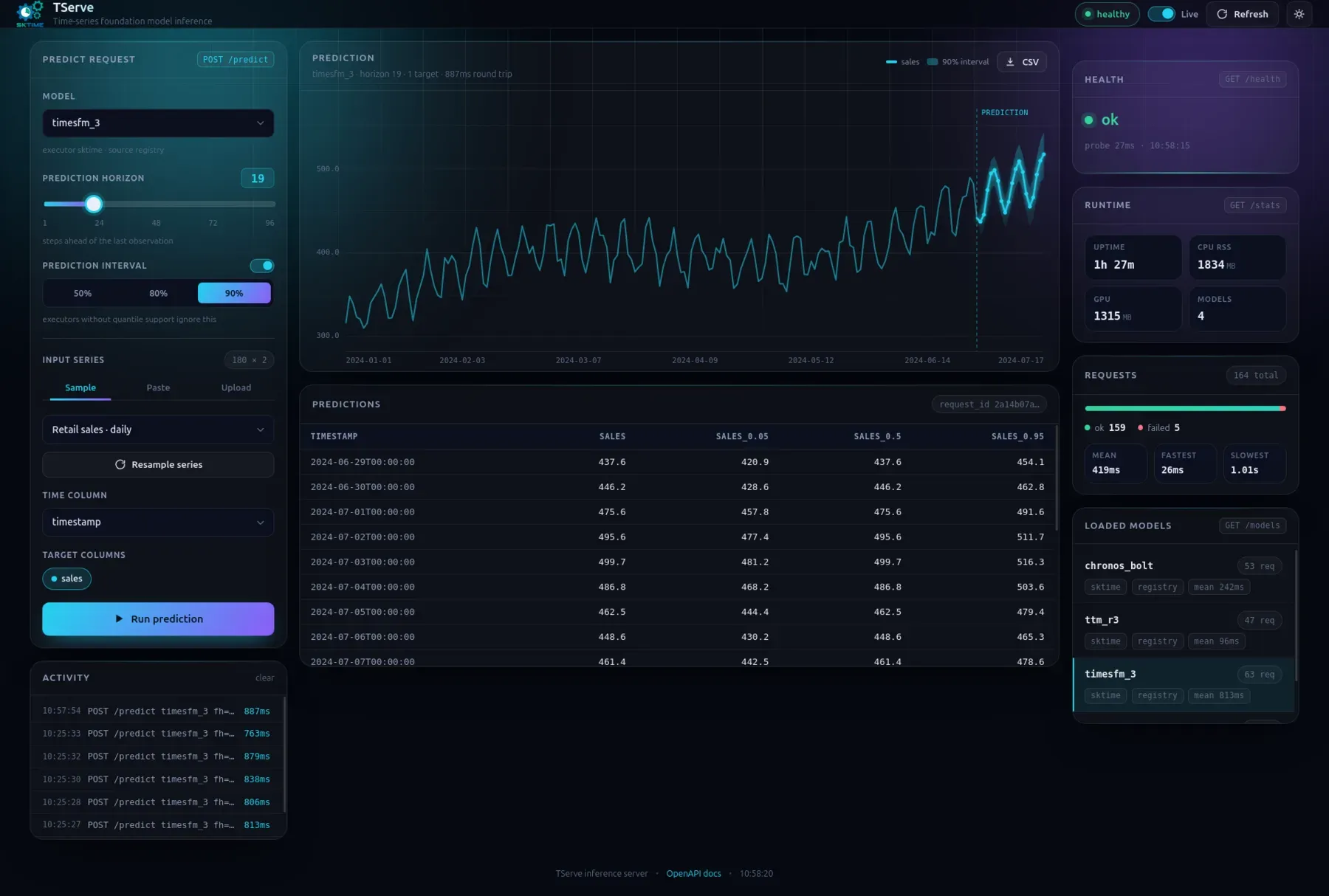
For colleagues who do not write code, this is the fastest way to try a model on their own data. For you, it is a quick check that a freshly deployed server works. If you want the machine-readable view instead, the same numbers come from three endpoints:
| route | what it returns |
|---|---|
GET /health | whether the process is alive |
GET /models | the models this process loaded (not the whole catalog) |
GET /stats | uptime, memory, and requests and latency per model |
Swagger UI at /docs and ReDoc at /redoc document the full HTTP API, generated
from the running server. If a request goes wrong, you get a status code that
says why: 422 for a body that does not match the schema, 400 for a model
that is not loaded or a column that is missing, both with a request_id and a
message. From Python, asking for a model the server does not have looks like
this:
RuntimeError model 'moirai_2' is not loaded on this server (loaded: 'chronos_2', 'naive', 'timesfm_2_5')Why run it yourself?
TServe runs on your own hardware, from pip, from a Docker image, or inside your own Python application. There is no hosted TServe API. That has two consequences.
Your data never leaves your machine. And nobody can raise the price or switch
off the model you depend on. Many forecasting foundation models are sold as
gated cloud services, even when their weights are open and permissively
licensed. Franz wrote about this in
The Temporer Has No Clothes, and TServe is
the server side of the same argument: running these models yourself takes one
docker run.
The server itself is open source under the BSD 3-Clause license. Be aware that this license covers TServe, not the models. Every checkpoint comes with its own license from its vendor, so check it before you put a model into production.
What TServe does not do (yet)
TServe is at version 0.1.0, released on 24 September 2026. A few things to know before you build on it:
- No authentication. Every route is open to whoever can reach the port, so put the server behind your own reverse proxy or inside a private network.
- One series per request.
pastcan have several target columns, but panel and hierarchical data are outside the request format for now. - No stable API yet. Until 1.0, a minor release may change the HTTP API, the Python client, or the command line.
Try it
TServe was created by Armaghan Shakir, who wrote nearly all of it. Thank you!
pip install "tserve[server,chronos]"
tserve chronos_2- Code: github.com/sktime/tserve
- Documentation: tserve.readthedocs.io
- Model catalog: 117 checkpoints
- Docker images: hub.docker.com/r/sktime/tserve
If something breaks, or a model you need is missing, please open an issue. And if you want to run TServe in production with support behind it, our enterprise team can help.